Where to Check Creator Break Announcements and Sudden Stream Cancellations
When a live stream does not start on schedule, viewers are often left wondering whether the streamer is running a few minutes late or if the broadcast has been canceled entirely. Knowing where to look saves time and prevents unnecessary waiting on an offline screen. This guide provides a systematic, prioritized checklist of official communication channels—from immediate emergency alerts to long-term hiatus announcements.
The 5-Minute Emergency Verification Checklist for Late Streams
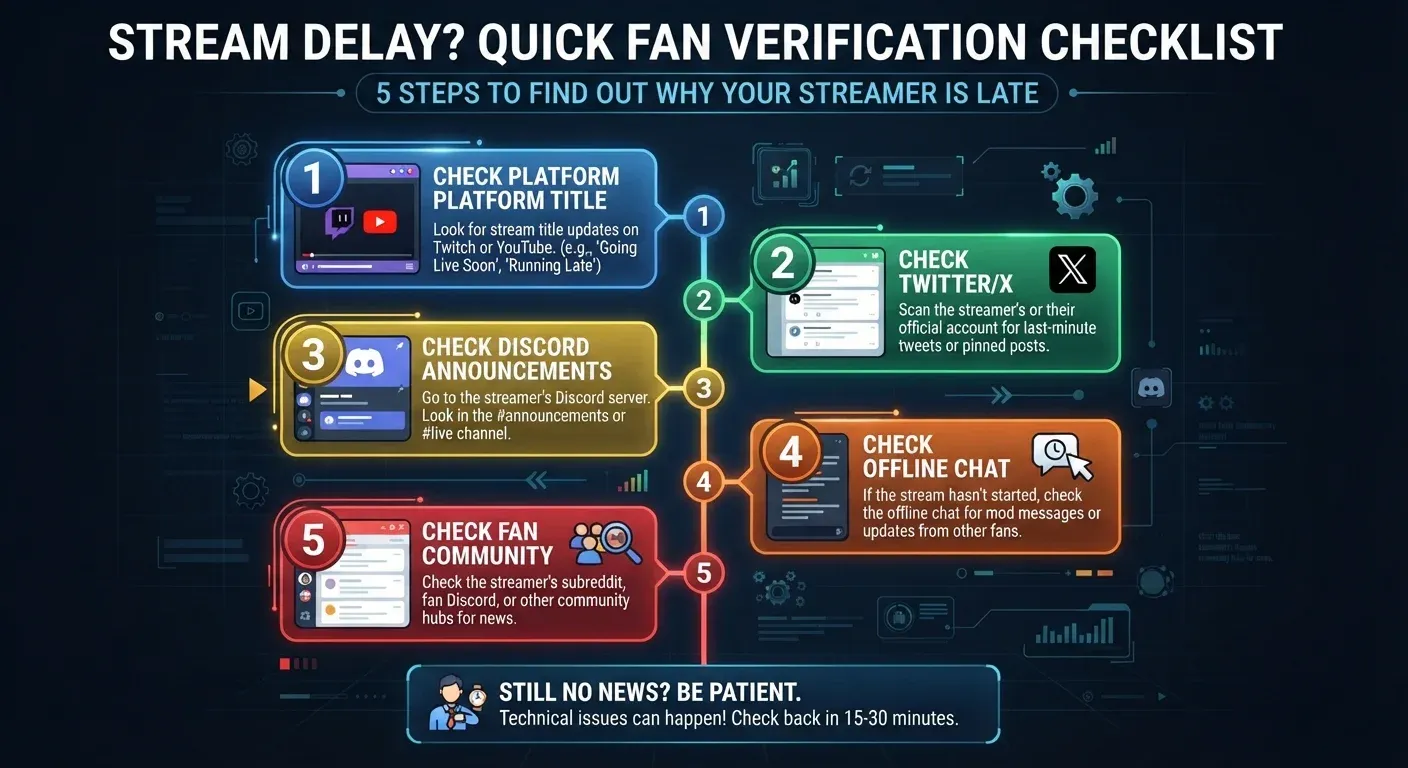
When a stream is 5 to 10 minutes late, sitting on a blank video player is inefficient. Execute this 3-step triage workflow to confirm the stream status quickly:
- Check Platform Title & Offline Chat (Minutes 1–2): Go directly to the creator's channel on Twitch, YouTube, or Kick. Inspect the channel header title, stream banner, or pinned messages in the offline chat room. Streamers often update their stream title to "Canceled Today" or post an updated start time directly in the chat box.
- Check Twitter / X or Instagram Stories (Minute 3): Social media is the primary quick-reaction channel for sudden emergencies like hardware failures, internet outages, or sudden illness. A short text post is frequently published minutes before or right at the scheduled start time.
- Check Discord Announcements (Minutes 4–5): If public social feeds yield no news, navigate to the creator's official Discord server. Check the
#announcementsor#schedulechannels where community moderators or the streamer provide detailed updates.
Official Streaming Platform Notification Channels
While social media offers rapid updates, integrated tools directly on primary streaming platforms remain the most authoritative sources of truth.
YouTube
YouTube creators rely on the Community Tab to post text and image updates, weekly schedule overviews, or sudden absence notices. If a pre-scheduled live stream event is canceled, the creator will either remove the upcoming broadcast or update the scheduled start time. For extended breaks (hiatuses), creators frequently update their channel banner or "About" section with expected return dates.
Twitch & Kick
For dedicated live-streaming platforms like Twitch and Kick, creators can update profile announcements or channel headers. Even when a channel is offline, the chat room remains functional. Always look for messages pinned by the creator or channel moderators explaining why a stream is delayed or canceled.
Social Media & Discord: Emergency & High-Speed Updates
When sudden technical problems arise, creators rarely log into their primary streaming software dashboard; instead, they issue rapid mobile updates via social channels.
Twitter / X & Instagram Stories
Twitter / X serves as the primary broadcasting tool for live streamers globally. A short tweet reaches thousands of viewers instantly. Many creators operate a secondary "alt" account dedicated specifically to schedule updates and casual communication. Instagram Stories offer a visual medium for quick video or image updates that naturally expire after 24 hours, keeping temporary cancellations from permanently cluttering a creator's main profile feed.
Discord Servers
A creator's official Discord server acts as the central hub for their active core community, offering structured channels:
- Announcements / Schedule Channels: Dedicated locations for weekly stream plans, holiday breaks, or long-term operational pause notices.
- Moderator Announcements: If a creator experiences a personal emergency or sudden power outage, community moderators will publish official statements on their behalf in these channels.
Comparing Channel Speed and Reliability
Notification Channel | Update Speed | Reliability | Primary Purpose |
|---|---|---|---|
Twitter / X | Instant (Under 5 minutes) | Very High | Urgent stream cancellations, sudden technical failures |
Discord Announcements | Fast (5–15 minutes) | Absolute | Detailed explanations, long-term break schedules, Q&A |
Offline Chat / Channel Title | Fast (5–10 minutes) | Absolute | Direct updates for viewers currently waiting on channel |
YouTube Community Tab | Moderate (15–30 minutes) | Absolute | Weekly schedule changes, planned recurring breaks |
Fan Groups / Subreddits | Variable | Medium | Community news aggregation, viewer discussions |
Automated Tools and Community Aggregators
Checking multiple individual accounts manually can be tedious if you follow many streamers. Automated tools streamline this process.
Automated Notification Bots (Discord Webhooks & Push Alerts)
- Enable Push Notifications: Turn on mobile notification bell icons within the Twitch, YouTube, or Twitter / X apps for preferred creators to receive immediate alerts when they post.
- Discord Webhooks & Bots: Community servers frequently integrate automated bots that pull tweets, YouTube community posts, and stream status changes directly into dedicated Discord channels.
Fan Communities (Reddit & Community Chats)
For high-profile creators with large audiences:
- Subreddits and Fan Pages: When a creator goes silent without posting, early-bird viewers often aggregate verified news on Reddit or community forums.
- Community Chat Groups: Dedicated viewer groups frequently verify a streamer's status based on in-game activity, Steam status, or direct moderator updates.
Viewer Etiquette and Best Practices When Streams Are Canceled
How viewers react to sudden stream cancellations impacts community health and creator well-being:
- Respect Creator Privacy: Streamers require time off for health, personal matters, or burn-out recovery. Avoid sending aggressive private messages (DMs) or demanding personal explanations.
- Avoid Spreading Unverified Rumors: If an official announcement has not yet been posted, refrain from speculating or spreading negative claims on public forums.
- Monitor Official Sources: Wait patiently for verified updates posted across the creator's official channels.
FAQ
1. Why is a streamer 30 minutes late without any announcement?
This situation usually indicates an acute technical emergency (such as a sudden power outage or internet failure) or a personal health issue preventing the creator from accessing their phone. Check the official Discord server, as moderators often publish updates on the creator's behalf shortly after.
2. What is the fastest way to receive cancellation alerts without constantly checking social media?
Join the creator's official Discord server and enable push notifications specifically for the #announcements channel. Alternatively, enable mobile push notifications for the creator's primary Twitter / X account.
3. What does "Hiatus" mean in the streaming community?
A hiatus refers to an extended, planned break from streaming (ranging from a few weeks to several months) taken for personal reasons, content restructuring, or burn-out recovery. Official hiatus announcements are published on YouTube Community tabs, Twitter / X, or Discord.
4. How reliable is a creator's public Google Calendar for daily schedule changes?
Google Calendars and Twitch Schedule tabs are reliable for long-term planning. However, for sudden, same-day stream cancellations, creators prioritize posting rapid updates on Twitter / X or Discord rather than manually updating calendar entries.